
MyGCI3.8.4 - App Store
You'll be able to see results in few seconds.
Publisher Description


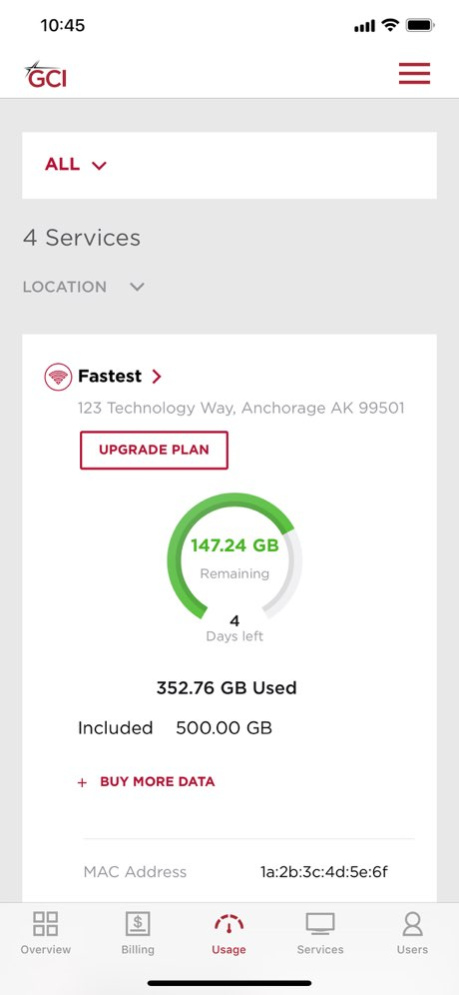

eBill, Usage Viewer, and account management - now all in one place and with one login for all your residential accounts. We heard you, and have made a ton of improvements to the MyGCI experience.
. View internet and mobile data usage
. Buy additional data
. View and pay your bill
. Set up autopay or schedule a single payment in advance
. Upgrade select TV & internet plans
. Add premium channels to your TV plan
. Manage your account
And much more, all from the new-and-improved MyGCI
Version History Chat can now be accessed without logging in. 3.8.4 12/17/2025 Updated for compatibility 3.8.3 03/12/2025 Updates for username and password recovery.
Updated text formatting 3.8.1 04/26/2023 Bug fixes. 3.7.5 12/15/2021 Bug fixes. 3.7.3 09/16/2020 Bug fixes. 3.7.2 09/14/2020 Updated home screen. 3.7.1 06/25/2020 Added call and chat into the side menu. 3.7 04/22/2020 Added account switching for users with multiple accounts.
Added back button.
Bug fixes. 3.6 02/07/2020 We’ve given the MyUsage app a complete overhaul and renamed it MyGCI. It’s now packed with features:
· Usage viewer is now easier to read
· You can now buy additional data for No Worries internet plans, even before you’ve used all the data included in your plan
· View and pay your bill, right from the app
· View and manage your service details
· View and upgrade your internet and TV services
· Set up and manage autopay
· Add premium channel packages to your TV plan
· And so much more… 3.5 11/16/2018 We’ve given the MyUsage app a complete overhaul and renamed it MyGCI. It’s now packed with features:
· Usage viewer is now easier to read
· You can now buy additional data for No Worries internet plans, even before you’ve used all the data included in your plan
· View and pay your bill, right from the app
· View and manage your service details
· View and upgrade your internet and TV services
· Set up and manage autopay
· Add premium channel packages to your TV plan
· And so much more… 3.3 08/11/2018 We’ve given the MyUsage app a complete overhaul and renamed it MyGCI. It’s now packed with features:
· Usage viewer is now easier to read
· You can now buy additional data for No Worries internet plans, even before you’ve used all the data included in your plan
· View and pay your bill, right from the app
· View and manage your service details
· View and upgrade your internet and TV services
· Set up and manage autopay
· Add premium channel packages to your TV plan
· And so much more… 3.2 08/10/2018 We’ve given the MyUsage app a complete overhaul and renamed it MyGCI. It’s now packed with features:
· Usage viewer is now easier to read
· You can now buy additional data for No Worries internet plans, even before you’ve used all the data included in your plan
· View and pay your bill, right from the app
· View and manage your service details
· View and upgrade your internet and TV services
· Set up and manage autopay
· Add premium channel packages to your TV plan
· And so much more… 3.1 08/07/2018 We’ve given the MyUsage app a complete overhaul and renamed it MyGCI. It’s now packed with features:
• Usage viewer is now easier to read
• You can now buy additional data for No Worries internet plans, even before you’ve used all the data included in your plan
• View and pay your bill, right from the app
• View and manage your service details
• View and upgrade your internet and TV services
• Set up and manage autopay
• Add premium channel packages to your TV plan
• And so much more… 3.0 08/01/2018 The hard crash for users with more than 6 numbers when entering the Shared Data view. 2.6 06/11/2017 The bug where the telephone labels were not showing up in the Wireless tab has been addressed. 2.5 05/17/2017 The crash when accessing Wireless Detail Usage has been addressed.
The Help page has been updated. 2.4 05/10/2017 Bug fixes 2.3 01/06/2016 Salutations have been updated, usage updates update, legal disclaimer 2.2 02/24/2015 Minor UI update 2.1 06/07/2014 Complete UI update
Optimized for iOS7
More granular reporting features
Updated graphs
Multiple bug fixes 2.0 04/12/2014 Stability Improvements
Bug Fixes 1.2 06/07/2013 - Bug Fixes 1.1 03/08/2013 1.0 01/25/2013
About MyGCI
The company that develops MyGCI is GCI Communication Corp. The latest version released by its developer is 3.8.4.
To install MyGCI on your iOS device, just click the green Continue To App button above to start the installation process. The app is listed on our website since 2026-10-13 and was downloaded 0 times. We have already checked if the download link is safe, however for your own protection we recommend that you scan the downloaded app with your antivirus. Your antivirus may detect the MyGCI as malware if the download link is broken.
How to install MyGCI on your iOS device:
- Click on the Continue To App button on our website. This will redirect you to the App Store.
- Once the MyGCI is shown in the iTunes listing of your iOS device, you can start its download and installation. Tap on the GET button to the right of the app to start downloading it.
- If you are not logged-in the iOS appstore app, you'll be prompted for your your Apple ID and/or password.
- After MyGCI is downloaded, you'll see an INSTALL button to the right. Tap on it to start the actual installation of the iOS app.
- Once installation is finished you can tap on the OPEN button to start it. Its icon will also be added to your device home screen.
Program Details
System requirements
Download information
Pricing
Version History
version 3.8.4
posted on 2026-10-13
Version History Chat can now be accessed without logging in. 3.8.4 12/17/2025 Updated for compatibility 3.8.3 03/12/2025 Updates for username and password recovery.
Updated text formatting 3.8.1 04/26/2023 Bug fixes. 3.7.5 12/15/2021 Bug fixes. 3.7.3 09/16/2020 Bug fixes. 3.7.2 09/14/2020 Updated home screen. 3.7.1 06/25/2020 Added call and chat into the side menu. 3.7 04/22/2020 Added account switching for users with multiple accounts.
Added back button.
Bug fixes. 3.6 02/07/2020 We’ve given the MyUsage app a complete overhaul and renamed it MyGCI. It’s now packed with features:
· Usage viewer is now easier to read
· You can now buy additional data for No Worries internet plans, even before you’ve used all the data included in your plan
· View and pay your bill, right from the app
· View and manage your service details
· View and upgrade your internet and TV services
· Set up and manage autopay
· Add premium channel packages to your TV plan
· And so much more… 3.5 11/16/2018 We’ve given the MyUsage app a complete overhaul and renamed it MyGCI. It’s now packed with features:
· Usage viewer is now easier to read
· You can now buy additional data for No Worries internet plans, even before you’ve used all the data included in your plan
· View and pay your bill, right from the app
· View and manage your service details
· View and upgrade your internet and TV services
· Set up and manage autopay
· Add premium channel packages to your TV plan
· And so much more… 3.3 08/11/2018 We’ve given the MyUsage app a complete overhaul and renamed it MyGCI. It’s now packed with features:
· Usage viewer is now easier to read
· You can now buy additional data for No Worries internet plans, even before you’ve used all the data included in your plan
· View and pay your bill, right from the app
· View and manage your service details
· View and upgrade your internet and TV services
· Set up and manage autopay
· Add premium channel packages to your TV plan
· And so much more… 3.2 08/10/2018 We’ve given the MyUsage app a complete overhaul and renamed it MyGCI. It’s now packed with features:
· Usage viewer is now easier to read
· You can now buy additional data for No Worries internet plans, even before you’ve used all the data included in your plan
· View and pay your bill, right from the app
· View and manage your service details
· View and upgrade your internet and TV services
· Set up and manage autopay
· Add premium channel packages to your TV plan
· And so much more… 3.1 08/07/2018 We’ve given the MyUsage app a complete overhaul and renamed it MyGCI. It’s now packed with features:
• Usage viewer is now easier to read
• You can now buy additional data for No Worries internet plans, even before you’ve used all the data included in your plan
• View and pay your bill, right from the app
• View and manage your service details
• View and upgrade your internet and TV services
• Set up and manage autopay
• Add premium channel packages to your TV plan
• And so much more… 3.0 08/01/2018 The hard crash for users with more than 6 numbers when entering the Shared Data view. 2.6 06/11/2017 The bug where the telephone labels were not showing up in the Wireless tab has been addressed. 2.5 05/17/2017 The crash when accessing Wireless Detail Usage has been addressed.
The Help page has been updated. 2.4 05/10/2017 Bug fixes 2.3 01/06/2016 Salutations have been updated, usage updates update, legal disclaimer 2.2 02/24/2015 Minor UI update 2.1 06/07/2014 Complete UI update
Optimized for iOS7
More granular reporting features
Updated graphs
Multiple bug fixes 2.0 04/12/2014 Stability Improvements
Bug Fixes 1.2 06/07/2013 - Bug Fixes 1.1 03/08/2013 1.0 01/25/2013
version 3.8.4
posted on 2025-12-17
Chat can now be accessed without logging in.
version 3.8.3
posted on 2025-03-12
Mar 12, 2025
Version 3.8.3
Updated for compatibility
version 3.8.1
posted on 2023-04-26
Apr 26, 2023
Version 3.8.1
Updates for username and password recovery.
Updated text formatting
version 3.7.5
posted on 2021-12-15
Dec 15, 2021 Version 3.7.5
Bug fixes.
version 3.7.3
posted on 2020-09-16
Sep 16, 2020 Version 3.7.3
Bug fixes.
version 3.7.1
posted on 2020-06-25
Jun 25, 2020 Version 3.7.1
Updated home screen.
version 3.7
posted on 2020-04-22
22 Apr 2020 Version 3.7
Added call and chat into the side menu.
version 3.7
posted on 2020-04-22
Apr 22, 2020 Version 3.7
Added call and chat into the side menu.
version 3.6
posted on 2020-02-07
Feb 7, 2020 Version 3.6
Added account switching for users with multiple accounts.
Added back button.
Bug fixes.
Disclaimer
Official App Store Link
We do not host MyGCI on our servers. We did not scan it for viruses, adware, spyware or other type of malware. This app is hosted by Apple and passed their terms and conditions to be listed there. We recommend caution when installing it.
The App Store link for MyGCI is provided to you by apps112.com without any warranties, representations or guarantees of any kind, so access it at your own risk.
If you have questions regarding this particular app contact the publisher directly. For questions about the functionalities of apps112.com contact us.
